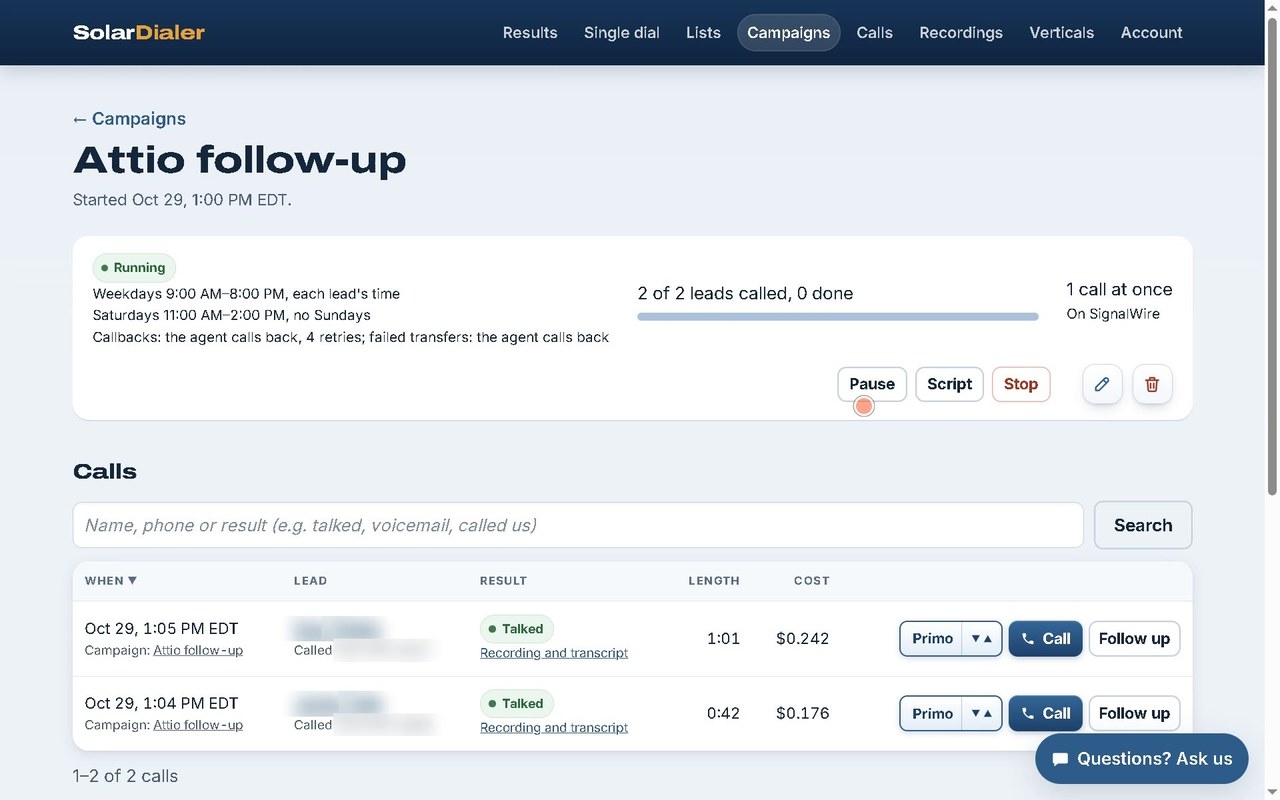
Connect your Attio workspace: people you add to a list you pick, or every new person, are called by
SolarDialer's AI agent within minutes, interested leads are transferred live to your closer, and every call
lands on the person as a note with its summary, transcript and recording.
You need a SolarDialer account (you can create one on the way), and to be an admin of the Attio
workspace you connect: Attio lets only admins connect an app to the whole workspace.
Call the people on a list
Choose one of your Attio lists (or "any new person") and a campaign: each person added to the list joins the
campaign at once, called on its schedule, always within the lead's legal calling hours.
Every call on the person
Each call adds a note to the person, titled with its outcome, holding the AI summary, the answers, the
transcript and a link to the recording.
Interested leads move on
Pick a list and each interested lead is added to it (and, if you like, transferred ones to another).
Callbacks become tasks, due when the lead asked, assigned to you.
Nothing set up in your workspace
SolarDialer adds no attributes or objects to Attio: it uses your people, your lists, notes and tasks, so your
own views and workflows work on them as they are.
Set up in 3 steps
ConnectClick Connect Attio. If you aren't signed in to SolarDialer, sign in (or create an
account) and click it again. Then sign in to Attio, pick your workspace and allow access.
Choose who is calledOn Account → Integrations, add a rule: one of your lists of people (or
any new person) and the campaign those people join. Add as many rules as you like. Attio tells SolarDialer the
moment a person is added.
Choose where interested leads goPick the list interested leads are added to, and
optionally another for transferred ones. Leave it empty to add them to no list.
What SolarDialer reads and writes in Attio
Attio data
What SolarDialer does with it
People
Reads the person a rule picks (name, phone, email and primary location) to call them.
Finds (by phone or email) or creates the person for a call that reached someone, an interested lead or a
callback.
Lists and list entries
Reads your lists of people for the pickers on your Integrations page.
Adds an interested lead to the list you picked (never twice).
Notes and tasks
Adds a note to the person for each call and when someone asks not to be called,
and a task for each callback booked.
Workspace members and objects
Reads who connected (callback tasks are assigned to them) and the
people object's id.
Webhooks
While you have rules, keeps one webhook for new entries on your rules' lists (and new
people, for "any new person") so they are called at once; changes it when your rules change and deletes it
when you disconnect.
People are called only within each state's calling hours, never when they are on your
do-not-call list or asked not to be called, and at most the attempts your campaign allows. Your Attio data is
used only to place and report your calls; see our privacy policy and
terms.
Disconnecting
Click Disconnect Attio on Account → Integrations: SolarDialer's access is revoked and
its webhook deleted at once (you can also remove SolarDialer from your workspace's apps in Attio). The leads and
calls already in SolarDialer stay in your account until you delete them, and nothing is removed from Attio. To
have your SolarDialer data deleted, email info@solardialer.net.
Full setup guide
Everything you need to set it up and keep it running. Stuck? Email info@solardialer.net.
3½ minutes, start to end on one account: connecting Attio, a rule that sends a list's people to a campaign, the calls, and each call back in Attio as a note, a list entry and a callback task. Made-up people; the voice is an AI voice. Watch it on YouTube.
Before you start
A SolarDialer account with at least one campaign that isn't finished: a rule sends people to a campaign, and the rule form only shows once you have one.
To be an admin of the Attio workspace you connect. Attio lets only workspace admins connect an app to the whole workspace, and SolarDialer needs that to be told when people are added.
People in Attio with a phone number in their Phone numbers attribute: a person without one can't be called.
A list of people in Attio for each group you want called, unless you use "Any new person". Lists of companies or other objects aren't offered.
Step by step
Start connectingClick Connect Attio on solardialer.net/attio, or on Account → Integrations under Connect. If you aren't signed in to SolarDialer, sign in (or create an account) and click it again.
Allow access in AttioSign in to Attio, pick your workspace and allow access. You come back to Account → Integrations with "Attio connected (your workspace)". Finish within 15 minutes of clicking Connect, in the same SolarDialer account.
Add a rule: who is calledUnder Your CRM, in the Attio section's People to call, pick Who is called: Any new person, or Added to <one of your lists>. Pick the Campaign they join and click Add rule. Add as many rules as you need, one per list.
Choose where interested leads goUnder Interested leads go to (added to this list), pick the list interested leads are added to. Optionally pick another under Transferred leads go to for leads put through to your closer. Click Save. Leave it on No list to add them to no list.
Test itAdd a person with your own phone number to a rule's list in Attio. Within a minute or so they are a lead in that campaign in SolarDialer, and the campaign calls them on its schedule, within calling hours. After the call, the person has a note in Attio.
Settings, explained
Who is called: Any new person
Every person added to the workspace from the moment you add the rule joins the campaign.
Who is called: Added to <list>
Every person added to that list from the moment you add the rule joins the campaign. People already on the list are not called.
Campaign
The campaign the rule's people join. It calls them on its own schedule, within each lead's legal calling hours and attempt limits.
Remove
Next to each rule: stops it. People it already added stay in the campaign.
Interested leads go to (added to this list)
The list an interested lead is added to. A person already on it isn't added twice. No list: interested leads are added to no list.
Transferred leads go to (optional)
Another list for leads put through to your closer. The same list: transferred leads go to the interested list.
What it reads and writes
People (read)
For a person a rule picks: their name, first current phone number, email address and primary location (address, city, state, ZIP, country). These make the lead. A lead with no state gets it from its ZIP or area code.
People (written)
For a call that reached someone, an interested lead or a callback, SolarDialer uses the person the lead came from, else finds one by phone, then by email, else creates one with the lead's name, phone and email. Calls nobody answered never create people.
Notes
Each call adds a note to the person titled "SolarDialer call: <outcome>" (Talked, Transferred, Transfer failed, No answer, Do not call and so on), holding its length, campaign and time, the AI summary, the answers, any objections, the transcript, a link to the recording and a link to the call in SolarDialer. Someone who asks not to be called gets a note titled "Asked not to be called (SolarDialer)".
Lists
Your lists of people are read for the pickers. An interested lead is added to the list you picked (a transferred one to the transfer list, if you picked one).
Tasks
Each callback booked becomes a task, "Callback (SolarDialer): <name>" with when they asked and who calls back, due at that time, linked to the person and assigned to the workspace member who connected.
Workspace
Reads the workspace's name, the member who connected and the people object's id.
Webhook
While you have rules, one webhook tells SolarDialer about new entries on your rules' lists (and new people, for Any new person). It changes when your rules change and is deleted with your last rule or when you disconnect.
Not written
SolarDialer adds no attributes, objects or select options to your workspace, and never deletes anything in Attio.
Troubleshooting
"Attio didn't let SolarDialer manage its notifications: connect again as an admin of your Attio workspace."
The person who connected isn't a workspace admin, so the rule wasn't kept. Have an admin of the workspace click Connect Attio, then add the rule again.
"Attio didn't accept our notifications (...). Try again in a minute."
Attio refused or failed to make the webhook, and the rule wasn't kept. Wait a minute and add the rule again.
"Your rules aren't active: ..." right after connecting
Your rules were kept from an earlier connection, but their webhook couldn't be made again. Do what the rest of the message says (usually: connect as a workspace admin).
"That Attio link has expired. Connect again from here."
More than 15 minutes passed between clicking Connect Attio and allowing access. Click Connect Attio again.
"Log in to the account that started connecting Attio."
You came back from Attio signed in to a different SolarDialer account, or signed out. Sign in to the account you started from and connect again.
"Attio couldn't be connected: that Attio workspace is connected to another SolarDialer account"
An Attio workspace links to one SolarDialer account. Disconnect it in the other account first, or connect from that account.
"Attio wasn't connected: access wasn't granted."
Access was declined on Attio's page. Click Connect Attio and allow access.
"Your Attio lists couldn't be read just now; reload to add a rule."
Attio didn't answer when the page loaded. Reload the page.
My list isn't in the Who is called picker
Only lists of people are offered. A list of companies or deals can't be used.
A person was added to the list but wasn't called
Check that they have a phone number, that the rule's campaign is running and that it is within their calling hours. People already called through SolarDialer aren't added again, and people on your do-not-call list or who asked not to be called are never called.
The Attio section shows Disconnected: "SolarDialer's access was removed in Attio. Connect again."
SolarDialer was removed from the workspace's apps in Attio, or its access was revoked. Click Connect Attio to connect again; your rules come back.
"Last problem sending results: ..." under Attio
Attio refused or didn't answer one result. If Attio was busy or unreachable it is tried again shortly; anything else Attio refuses for one call is skipped so the rest still go.
I deleted SolarDialer's webhook in Attio
While you have rules, SolarDialer checks its webhook every hour and makes it again if it is gone or Attio stopped it.
FAQ
Are people already on my list called?
No. A rule picks people added to the list after you add it. To call someone already there, remove them from the list and add them again.
Do calls to leads that didn't come from Attio show up there?
Yes, once a call reaches someone, the lead is interested or books a callback: SolarDialer finds the person by phone or email, or creates them.
Are my past calls sent to Attio?
No. A new connection sends the results of calls from then on.
Can I connect more than one workspace?
Each workspace links to one SolarDialer account. Connect each workspace with its own admin.
What is SolarDialer allowed to do in Attio?
Read and write people, read lists and add entries to them, read and write notes and tasks, read workspace members and object settings, and manage its own webhooks.
What if the page offers Zapier instead of Connect Attio?
The direct connection isn't open on your account yet; until then, Zapier connects SolarDialer to Attio.
What does it cost?
The connection is free. Calls are billed by the minute from your SolarDialer balance, with $2 of free calls every month.
Disconnect
Click Disconnect Attio in the Attio section of Account → Integrations. SolarDialer's access is revoked and its webhook deleted at once.
You can also remove SolarDialer from your workspace's apps in Attio.
Leads and calls already in SolarDialer stay in your account, and nothing is removed from Attio. To have your SolarDialer data deleted, email info@solardialer.net.
Pay only when we're talking to someone
22¢ a minute while on a call, or 14¢ with your own phone line. Calls nobody answers
are free, and the first $2 of calls every month are on us. The Attio connection itself costs nothing.