SolarDialer

SolarDialer for WordPress

A lead who fills in your contact form is never more interested than in the next few minutes. The SolarDialer plugin sends every lead your website's forms collect to your calling campaign, and the AI voice agent calls them within a minute and live-transfers the interested ones to you.

Works with Contact Form 7, WPForms, Gravity Forms, Elementor Pro, Ninja Forms, Fluent Forms, Formidable and Forminator, and with custom forms through one line of code (see the plugin's FAQ). You need a SolarDialer account and its API key (Account → API). It's in the WordPress.org plugin directory; you can also download the zip.

Every form lead called

Each submission with a phone number goes to the campaign you pick, which calls it in the lead's calling hours, or is called right away. Your forms are never slowed down: it's sent in the background.

No field mapping

The plugin finds the name, phone, email, state, ZIP, city, address and message in each form by itself.

Proof of consent with each lead

Only visitors who ticked your "I agree to be called" box are sent, if you want, with the time, page, wording, and their IP address and browser.

See what happened

Settings → SolarDialer shows your recent leads and what became of each; every call's outcome, summary and recording are in your SolarDialer account.

Install in 3 steps

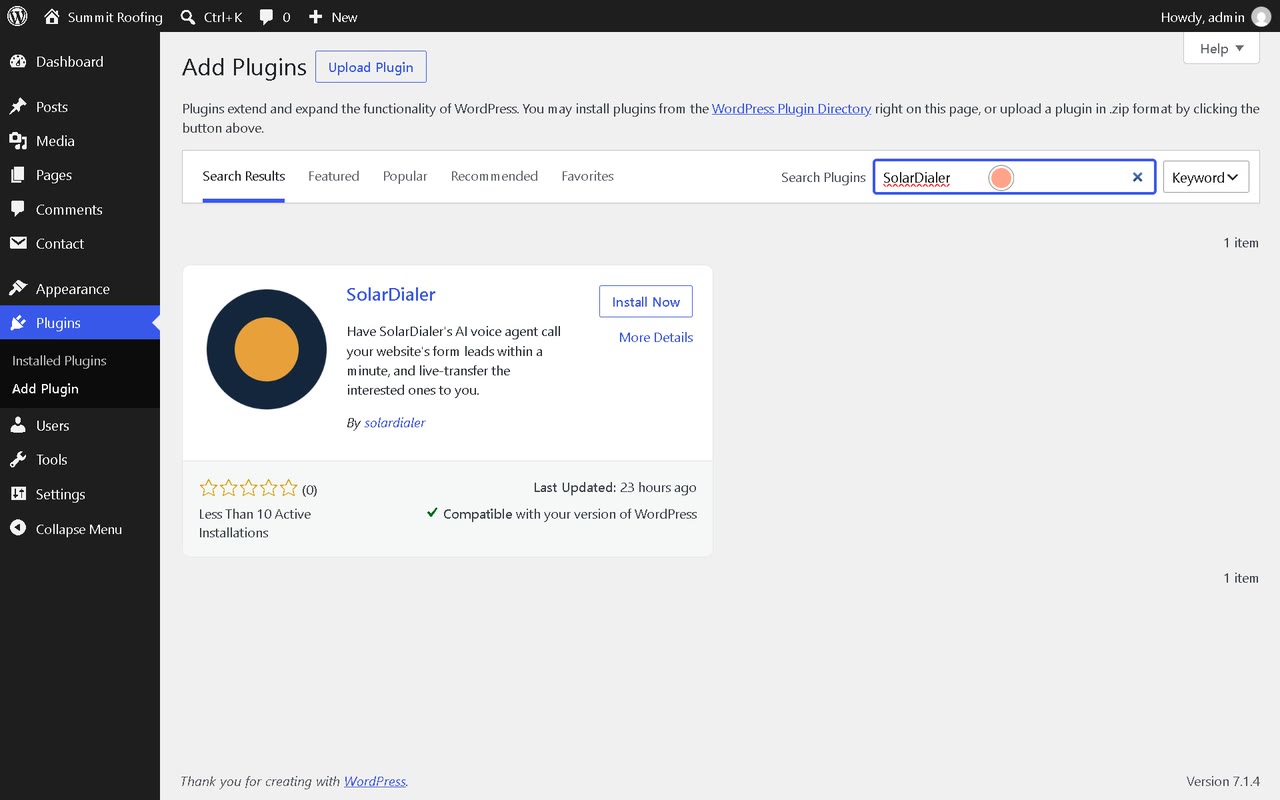
  1. Install the pluginIn WordPress: Plugins → Add New Plugin, search for SolarDialer, then Install Now and Activate (or Upload Plugin with the downloaded solardialer.zip).
  2. Add your API keySettings → SolarDialer: paste the key from Account → API on solardialer.net and save.
  3. Pick your campaignChoose the campaign your form leads go to, then send a test from your own form with your own phone number.

Full setup guide

Everything you need to set it up and keep it running. Stuck? Email info@solardialer.net.
Watch it work

3½ minutes: the plugin installed from the WordPress plugin directory, connected with an API key, a campaign picked, then a visitor's quote request through Contact Form 7 called at once and put through live. Made-up people on a demo site; the voice is an AI voice. Watch it on YouTube.

Before you start

  • A WordPress site (6.0 or newer, PHP 7.4 or newer) where you can add plugins.
  • One of: Contact Form 7, WPForms, Gravity Forms, Elementor Pro forms, Ninja Forms, Fluent Forms, Formidable Forms or Forminator, or a custom form you can add one line of code to.
  • A phone field on the form: a submission without a phone number is not sent.
  • A SolarDialer account with a campaign, and an API key from Account → API.

Step by step

  1. Install and activate itIn WordPress: Plugins → Add New Plugin, search for SolarDialer, click Install Now, then Activate. (Or download solardialer.zip from solardialer.net/wordpress and use Upload Plugin.)
  2. Create an API keyOn solardialer.net open Account → API and click Create API key. Copy it: it starts with sdk_.
  3. ConnectIn WordPress open Settings → SolarDialer, paste the key into API key and click Save Changes. The page then says which SolarDialer account it is connected to.
  4. Choose the campaignPick the campaign your form leads go to under Campaign, and under Each new lead choose Add it to the campaign or Call it right away. Save.
  5. Test itFill in your own form with your own phone number. Back on Settings → SolarDialer, Recent leads shows the submission and what happened to it; the lead is also in SolarDialer under Leads.

Settings, explained

API key
Connects the site to your SolarDialer account. The field never shows the saved key; leave it blank to keep it, or paste a new one to replace it. A key that doesn't start with sdk_ is refused and the saved one kept.
Campaign
The campaign each new lead joins. A running campaign calls its new leads in their calling hours. With no campaign chosen, leads are added to your SolarDialer leads only.
Each new lead: Add it to the campaign
The lead joins the campaign, which calls it on its schedule, within the lead's legal calling hours.
Each new lead: Call it right away
SolarDialer calls the lead at once if it's within their calling hours; otherwise the lead is saved and the campaign calls later.
Only these forms
Form IDs separated by commas. Empty means every form with a phone field is sent.
Consent box
Part of the name or label of your form's "I agree to be called" checkbox, for example consent. When set, only visitors who ticked it are sent.
Consent wording
The words next to that checkbox, kept with each lead as proof of what the visitor agreed to. Use the words "consent" and "call".
Consent proof
Also keep the visitor's IP address and browser with the lead. The time and page of the submission are always kept.

What it reads and writes

Sent to SolarDialer
The name (split into first and last), phone, email, state (a state's name becomes its two letters), ZIP, city, address and message the visitor entered; the source "Website form: <form name>"; the time and page of the submission; your site's address; your consent wording; the form plugin's saved entry number, when it saves one; and, unless turned off, the visitor's IP address and browser.
Proof of consent
SolarDialer keeps the consent record with the lead when it is complete: the page, IP address, browser, wording with the words consent and call, and a saved entry (WPForms with entries, Gravity Forms, Ninja Forms, Fluent Forms, Formidable, Forminator). Contact Form 7 doesn't save entries, so its leads arrive without one.
Kept in WordPress
Only the settings and the newest 20 lines of Recent leads, with each phone shortened to its last 4 digits. Deleting the plugin removes them.

Troubleshooting

Recent leads says "Not sent: the form had no phone number"

The plugin found no phone field. Use your form plugin's phone field type, or name the field so it includes phone, tel, mobile or cell.

Recent leads says "Not sent: the consent box was not ticked"

The visitor didn't tick it, or the Consent box setting doesn't match your checkbox. Put part of the checkbox's name or label in Consent box, or leave it empty to send every form.

"SolarDialer refused the key" on the settings page

The key was deleted or replaced on solardialer.net. Create a new one on Account → API and paste it in.

Recent leads stays empty after a test

Check that the form actually sent (its success message showed), that the form's ID is in Only these forms if you filled that in, and that WordPress's scheduled tasks run: a lead is sent a moment after the form, by WP-Cron. On a site with DISABLE_WP_CRON, make sure your server's cron calls wp-cron.php.

"Failed, trying again in 5 minutes"

SolarDialer couldn't be reached or answered with an error. The plugin tries once more five minutes later; if that fails too, the line says why.

"Refused by SolarDialer: phone already belongs to another lead in your account"

That number is already a lead in your account. Find it under Leads in SolarDialer.

"Added; not called yet" with Call it right away

It's outside the lead's calling hours, or they were called recently, or they asked not to be called. The lead is saved, and its campaign calls when it can.

A name went into the wrong place

The plugin reads fields by type, name and label. A field named Company Name or Business is never taken as the person's name. Rename a field so its label says what it is (First Name, Last Name, Phone, State, ZIP, Message).

FAQ

Does it work with a custom form?

Yes, with one line where your form handles a submission: do_action( 'solardialer_send_lead', array( 'name' => $name, 'phone' => $phone, 'email' => $email, 'state' => $state, 'message' => $message ), 'Quote form', 'quote-form' ). Your own field names work.

Does it slow my forms down?

No. The form only queues the lead; it is sent a moment later in the background.

Is it on WordPress.org?

Yes: wordpress.org/plugins/solardialer. You can install it from Plugins → Add New Plugin in your WordPress, or upload the zip from solardialer.net/wordpress.

Who is responsible for consent?

You are: have your visitors' consent to be called as the laws where they live require. Calls by an AI voice may need their prior written consent. The consent box and consent proof settings help you keep it.

What does it cost?

The plugin is free. Calls are billed by the minute from your SolarDialer balance, with $2 of free calls every month.

Disconnect

  • To stop sending leads, deactivate the plugin under Plugins.
  • Deleting it removes its settings and the Recent leads list from WordPress.
  • To cut the connection from SolarDialer's side, delete or replace the API key on Account → API.

Pay only when we're talking to someone

22¢ a minute while on a call, or 14¢ with your own phone line. Calls nobody answers are free.

No monthly fee, no minimum. See pricing

Call your form leads today

Questions? Call, text or +1 (689) 220-2019, or email info@solardialer.net. Another form plugin? Our API and Zapier app take leads from anywhere.